
Facebook recently launched the Post 3D which allow people to view and interact with different objects in a 360º perspective in the News Feed.
These 3D Posts They are instantly responsive to touch and movement on the phone, making the content "move" and allowing objects to be viewed from different angles.
[quote author=”Facebook”]O Post 3D It makes it easier to share and display your 3D assets on Facebook.
This feature, besides being fun and impressive, is a good option for showcasing various perspectives of environments and products in a single image.
How to create a 3D post?
- Create a 3D Post based on the 3D Post schedule.
- Share a link to a webpage that has Facebook's Open Graph Sharing metadata tags.
- Share a local resource on an Android device using the native Android sharing action.
- Drag and drop your resource into the Facebook post composer and publish it.
It sounds easy when you say it like that, doesn't it? But it's not quite that simple. Check this out. tutorial A step-by-step guide where we teach you how to create a Post 3D for your Facebook page.
Tutorial: How to create a 3D post on Facebook
1.) You need to have some 3D modeling software on your desktop, such as Cinema 4D or Maya, but it's also possible to use Windows 10 Paint 3D, which is much more intuitive and simple for users who don't have experience with 3D modeling. If you don't have Paint 3D on your computer...
2.) Create your 3D post in modeling software, remembering that your final file (Step 5) cannot exceed 3MB. Go to the export options in your 3D software and export the file with the .FBX extension.
3.) You will need to download one of the tools released by Facebook itself to convert this .FBX file to the glTF format.
Download the tool corresponding to your operating system here. Place the tool in a folder along with the .FBX file you saved from your 3D modeling software.
4.) Simply drag the .FBX file onto the “FBX2glTF-windows-x64.exe” file, and it will convert your file to the glTF standard. The tool will create a folder called “yourfilename_out” containing two files: a buffer.bin file and another file with the .gltf extension.
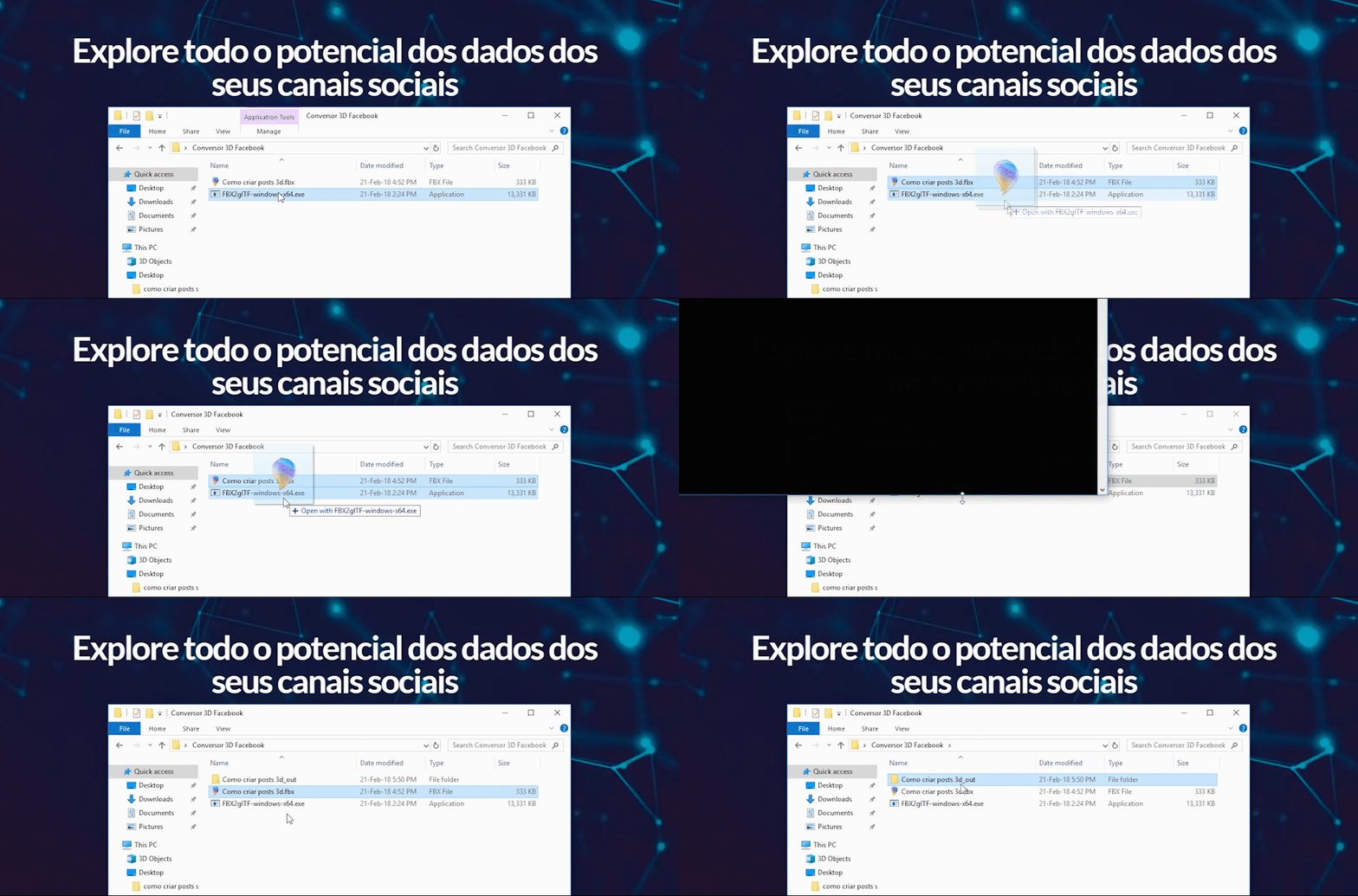
5.) Drag these two created files to the website. GLB Packer, who was also indicated by Facebook, and he will download a file called out.glb.
6.) Now, all you need to do is upload the .glb file to Facebook as a normal post and choose a background for your 3D model.
3D posts for inspiration
Some brands are already taking advantage of the hype and creating 3D posts on their pages. We've selected a few to inspire you and help you create something really cool. Check them out!
Imagine the possibilities this technology offers for showcasing your business's product!
Speaking of business, how are your online sales going?
Is the strategy you've been using for your business generating results? If you have this type of question, request a consultation now. Free Analysis!
We've already helped. more than 500 companies to increase their revenue through the internet, and yours could be one of them. Click the button and fill out the form right now!